Dental Website Design: What Patients Need Before They Book
On this page 9 sections
Key takeaways
- 77% of internet users search online before booking a healthcare appointment
- Only 39% of Australian health homepages show any price signal
- Direct website bookings can avoid third-party new-patient fees of $59 to $65.50 or more
- Mobile booking, click-to-call and hours must be reachable from every page
- AHPRA rules govern what claims and testimonials you can show on booking pages
Patients spend an average of 15 to 20 minutes researching a dental practice online before they pick up the phone or click to book, and most of that time is spent hunting for three things: what treatments you offer, what they'll cost, and whether they can trust you. Your dental website design either answers those questions clearly or it sends them to a competitor's site instead.
Why Your Booking Page Is Doing More Work Than You Think
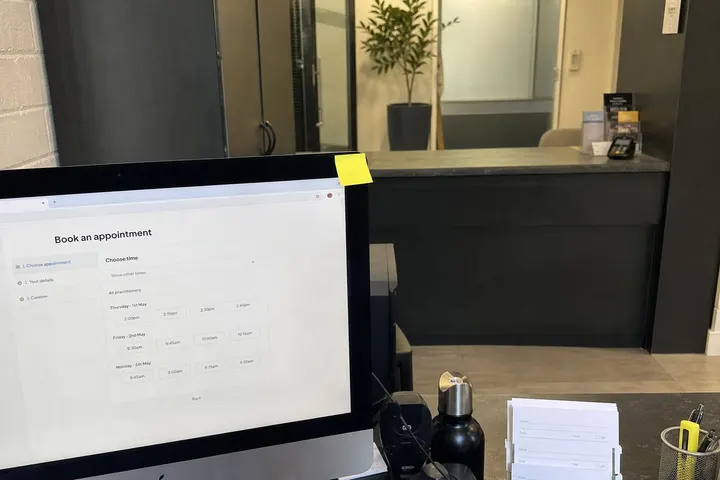
A booking page isn't just a contact form. It's the busiest page on your entire site because patients arrive there with a decision already half-made. They've clicked through from Google, scrolled your homepage, and decided you might be the clinic for them. Now they need to convert that interest into an actual appointment.
Patients research before they ring
Around 77% of internet users search online before booking a healthcare appointment, according to HealthEngine's dental marketing guide for practices. That research isn't just browsing your homepage. They're looking for specific treatment details, pricing signals, staff credentials, and patient feedback. If your booking page forces them to guess at costs or lacks trust markers, you've already lost momentum.
The cost of losing a patient to a third-party directory
When patients don't book directly on your website, they often end up on HotDoc, HealthEngine or other directories. The problem is real: those platforms charge practices between $59 and $65.50 plus GST per new patient routed through their service. If your own website booking flow is clunky, unclear or hard to find, you're paying that fee unnecessarily. Control your booking journey and you control your acquisition cost. That's why dental and healthcare web design must prioritise a seamless, trustworthy booking experience from the first click.
Treatment Information: Enough Detail to Remove the Fear
Patients don't book appointments because your site looks nice. They book because they understand what you're going to do and why it matters to them.
What to include on each treatment page
Every major treatment (fillings, root canals, orthodontics, implants, cosmetic dentistry) needs its own page with clear, jargon-light explanations of what the treatment involves, how long it takes, and what patients can expect before, during and after. Don't assume medical knowledge. Explain why a root canal is necessary, how it differs from an extraction, and what the aftercare looks like. Use headings, short paragraphs and bullet points so patients can scan the page in under two minutes.
How to structure content for anxious first-time patients
Anxiety about dental treatment is common and it drives booking hesitation. Address it directly. Include sections like "What does it feel like?" or "Will it hurt?" and give honest, practical answers. Mention sedation options if you offer them. Explain your sterilisation process and patient comfort measures. Link to your before-and-after gallery if you have treatment-specific imagery (ensuring it complies with AHPRA advertising guidelines for dentists, which we cover below).
Linking treatment pages directly to your booking flow
Every treatment page must have a direct path to your booking widget or online form. Don't make patients navigate back to a generic "Contact Us" page. Place a call-to-action button at the end of the treatment content that says "Book a consultation for this treatment" or similar, and make it link directly to a pre-populated booking form or to your practice-management widget. This reduces friction and keeps intent high.
Fee Transparency: The Element Most Dental Websites Get Wrong
Only 39% of Australian healthcare homepages provide any price signal at all, and that gap is costing clinics bookings. Patients will assume the worst if you don't tell them what to expect.
What 'price signals' actually means for a dental website
A price signal is any visible indication of cost: a starting price, a range, or a statement like "Check-ups from $X" or "We bulk bill eligible children under the Child Dental Benefits Schedule." Patients aren't asking for a full price list on your homepage. They're asking "Can I afford to call this clinic?" If you say nothing, many won't call at all.
How to handle fee ranges without over-promising
Publish indicative fees for common treatments (general check-up, scaling and cleaning, standard filling, crown). Explain that costs vary based on complexity and that a consultation is the only way to give a precise quote. Avoid absolute promises like "fillings cost only $X" because individual cases differ. Use phrases such as "fillings typically range from $X to $Y depending on size and location" to stay honest and defensible.
Child Dental Benefits Schedule and health fund information
If you treat children, mention the Child Dental Benefits Schedule clearly. State your bulk-billing policy and whether you offer extras cover or use HICAPS. Patients with private health insurance need to know upfront whether you claim directly, whether they'll have an out-of-pocket gap, and how to check their cover. This transparency removes a major booking barrier.
Trust Signals That Actually Move Patients to Book
Trust signals aren't nice-to-haves. They're conversion drivers. Patients need proof that you're qualified, regulated, and trusted by others.
Google reviews and what AHPRA says about testimonials
Google reviews are powerful because they're third-party. Display your Google Business Profile rating and a selection of recent reviews directly on your booking page or homepage. AHPRA advertising guidelines allow honest patient testimonials, but they must be authentic, not generic or paid endorsements. Never fake a review or oversell results. A five-star review that says "Dr. Smith was gentle and explained everything" is more credible than a glowing review claiming "life-changing dentistry."
Practitioner credentials and registration numbers
List the names and qualifications of your dentists, hygienists and specialists. Include their AHPRA registration numbers and any specialist qualifications. Link to their registration on the AHPRA website if possible. Patients want to know who they're seeing, their experience, and proof they're legally registered to practise.
Before-and-after imagery: what is and isn't allowed
Before-and-after photos for cosmetic dentistry and orthodontics are allowed under what AHPRA allows on dental websites, but they must be real patient images with consent, not stock photos or AI-generated images. They cannot make claims the images don't support (for example, "guaranteed results" or "life-changing smile"). Caption them factually and ensure the images are your own work, not borrowed from another practice or online source.
Mobile Booking: The Non-Negotiable in 2026
More than half of your booking traffic comes from mobile phones, and if your booking experience isn't optimised for mobile, you're losing half your leads.
What a mobile-first booking flow looks like in practice
A mobile-first booking flow means a booking button or widget is visible within two scrolls on mobile. Form fields are large enough to tap accurately. The booking process takes no more than three steps on a phone (select service, select time, enter details). Avoid pop-ups that obscure the page, auto-playing videos, or forms that require horizontal scrolling. Test the booking flow yourself on an actual phone before launch. See our mobile-friendly website guide for Australian businesses for more practical checks.
Direct booking widgets versus third-party directories
Your practice-management software (whether it's Centaur, HotDoc or another platform) should have a native booking widget that you can embed directly on your website. This widget should sync in real time with your clinic calendar, allow patients to choose their preferred practitioner, and send confirmation emails automatically. Avoid relying solely on HealthEngine or HotDoc links because those directories take a commission and don't reinforce your brand during booking.
Click-to-call, hours and location on every page
Your phone number should be clickable on every page of your site, not just on a contact page. Opening hours should be visible in the header or footer. Your full address and a map should be easy to find. Many mobile users are deciding whether to call or book while they're in the car or on the train, so make the decision instant.

AHPRA Compliance on Your Booking and Treatment Pages
Your booking and treatment pages must comply with AHPRA advertising guidelines or you risk complaints, regulatory action, and reputational damage.
What you cannot say on a dental booking page
Do not make claims that bypass professional judgment or create unsupported expectations. For example, you cannot advertise "pain-free dentistry guaranteed" or "we fix all cosmetic concerns in one visit." You cannot offer discounts for cosmetic procedures (AHPRA restricts this). You cannot publish testimonials claiming life-changing results without evidence. You cannot use words like "cure" or make disease claims unsupported by evidence. Avoid hyperbole, celebrity endorsements for clinical claims, and before-and-after images that don't fairly represent average outcomes.
How to frame calls to action within the guidelines
Frame CTAs around consultation, assessment and professional advice, not guaranteed outcomes. Say "Book a consultation to discuss your treatment options" rather than "Book your smile makeover now." Say "Learn whether you're a candidate for implants" rather than "Get implants today." This keeps your messaging honest, legally sound, and focused on moving patients toward professional assessment rather than toward impulse booking.
Privacy and Tracking: What Healthcare Websites Must Disclose
Healthcare websites in Australia must comply with the Privacy Act and the Australian Privacy Principles. Tracking and data collection rules are stricter for health information than for general business sites.
Third-party pixels and your privacy policy
If your website uses Google Analytics, Meta Pixel, or similar tracking tools, your privacy policy must disclose what data is collected, how it's used, and how long it's stored. A 2026 study found that 77% of health websites using third-party pixels did not mention them in their privacy policies. This is a compliance gap. Update your privacy policy before launch to name every tracking tool, explain its purpose, and state how users can opt out if applicable.
Practical steps for compliance without killing conversions
You don't need to remove tracking tools. You do need to disclose them. Add a privacy banner to your site that links to a detailed privacy policy. That policy should list each pixel or tracking tool, explain why you use it (to measure site performance, improve patient experience, run dental-specific ads), and provide contact details for privacy concerns. Ensure your booking form doesn't collect unnecessary health information upfront. Use cookie consent if you're running behavioural tracking.
Putting It All Together: A Booking Page Checklist
A high-converting dental booking page has three layers of information and trust-building.
Above the fold
Your clinic name, logo and opening hours
A clear headline like "Book your appointment in 60 seconds"
Your Google rating and review count
A prominent booking button or widget
Your phone number as a clickable link
Mid-page trust and information layer
Brief description of your practice and team credentials
Treatment overview or links to detailed treatment pages
Patient testimonials or recent Google reviews
Fee information or "Check-ups from $X" signal
Bulk billing or health fund information if relevant
Before-and-after images if applicable (compliant versions only)
The booking form or widget itself
Service selection dropdown (e.g., "General check-up", "Cleaning", "Cosmetic consultation")
Practitioner selection if offering choice
Date and time picker (mobile-optimised)
Patient name, phone, email fields only (no unnecessary health questions)
Confirmation message and automatic email confirmation
Link to privacy policy and booking terms
If you're building from scratch, see our website packages and discuss your treatment portfolio, booking integration needs and compliance requirements with your designer upfront. SEO for dental clinics also depends on clean, structured treatment content, so plan your site architecture carefully during the design phase.
Conclusion
Dental website design isn't about looks or brand storytelling. It's about moving patients from research mode into booking mode by answering their three core questions: What treatment do you offer? What will it cost? Can I trust you? A booking page that addresses those questions directly, with clear treatment information, honest fee signals, visible trust markers and a frictionless mobile booking flow will outperform a beautiful site that makes patients guess.
The financial case is straightforward. If you own your booking flow and avoid paying HotDoc or HealthEngine per-patient fees, you'll recover your website investment within months. If you comply with AHPRA guidelines, privacy law and accessibility standards from the start, you'll avoid costly redesigns and regulatory complaints later. Most importantly, patients will book faster because they trust you and understand what's next.
Start by auditing your current site against the checklist above. If you're missing treatment detail, fee transparency, mobile optimisation or trust signals, those are your immediate priorities. Work with a designer who understands healthcare compliance and has experience with practice-management booking integrations. The result will be a booking page that converts research into appointments.